Inspect calculations
Review financial hierarchies, periods and formulas in their business context.
Aivana Finoryx · Financial Workbench
Development release: Power BI host acceptance is still pending. Discuss a development pilot to validate your data and deployment requirements together.
From financial reporting to informed decisions. Compare actuals, plan, forecast and prior year, inspect calculations and explore scenarios with explicit assumptions directly in Power BI.
For finance and Power BI teams.
Package availability, trial duration and licence terms are agreed with Aivana. Validate the visual in your Power BI environment before deployment.
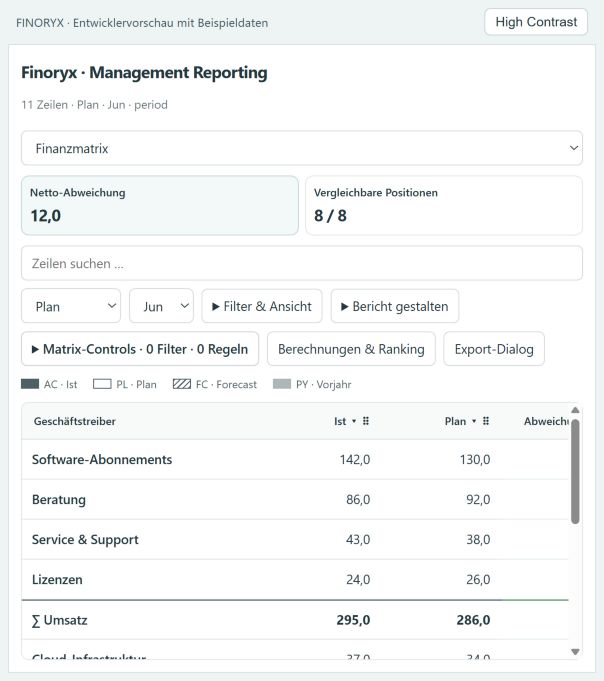
Review financial hierarchies, periods and formulas in their business context.
Explore scenarios and stress tests with explicitly defined assumptions.
Check data mapping, host behaviour and export permissions for your use case.
From data to a decision
Compare actuals, plan, forecast and prior year in Financial Workbench, the workspace for the financial matrix, periods and hierarchies.
Result: A traceable starting point for further analysis.
Requirement / boundary: Analysis uses your mapped data and comparison versions.
Inspect formulas, ranking and conditional formatting to understand relevant line items.
Result: You can review differences and calculations in their business context.
Requirement / boundary: Business interpretation and data quality still require review.
Use Decision Studio, the area for scenario comparison and stress testing, with explicitly defined assumptions.
Result: Actions become comparable under the selected assumptions.
Requirement / boundary: Simulations are not predictions. Drafts stay local and do not write back to source data.
Review targets, actions, budgets and dependencies together and export the view when permissions allow.
Result: A reasoned basis for the next decision discussion.
Requirement / boundary: Approval and execution follow your process; exports require host permissions.
Fictional application scenario
A fictional finance team examines a cost trend across several periods. In Financial Workbench it compares actuals and plan and inspects the underlying formula. In Decision Studio it compares two proposed actions, documenting their budgets, dependencies and an explicitly assumed cost trend. The comparison shows the implications of those assumptions for discussion. Scenario drafts stay local; the team implements approved changes through its own planning process.
Provide financial measures, consistent periods and hierarchies, and the plan and forecast versions you want to compare. Scenarios require explicit business assumptions; actions need targets, budgets and dependencies. Check Power BI download service permissions for exports.
Development release: scenario drafts stay local and do not change source data. Simulations depend on your assumptions. Export permissions and Power BI host acceptance must be considered.
Validate functionality in the intended Power BI host before deployment. Check your tenant policies, permissions and package instructions before using the visual in your environment.
When an approved .pbiviz package is available, import it as a custom visual in Power BI Desktop. Follow the package instructions and assign your report fields. Validate functionality in the intended Power BI host before deployment.
Development release: scenario drafts stay local and do not change source data. Simulations depend on your assumptions. Export permissions and Power BI host acceptance must be considered.
Contact Aivana with your use case and Power BI environment. Together we agree data mapping, deployment requirements and acceptance criteria. Power BI host acceptance is still pending.
Contact Aivana for pricing, licence scope, trial duration and package availability. Describe your use case and Power BI environment so we can agree the next steps.
Provide financial measures, consistent periods and hierarchies, and the plan and forecast versions you want to compare. Scenarios require explicit business assumptions; actions need targets, budgets and dependencies. Check Power BI download service permissions for exports.
Discuss the use case, data model and acceptance criteria for a development pilot with Aivana.